

Episode 1: WordPress Basics
Episode 2: How to Install and Choose a Theme
Episode 3: Basic WordPress Website Settings
Episode 4: How to Install Elementor Pro
Episode 5: Learn the Basics of Building a Website with Elementor Pro
Episode 6: Introduction to Elementor Pro Tools and Features
Episode 7: Creating Pages, Menus, Managing Menus, and Changing Logo & Favicon
Episode 8: Setting the Home Page and Blog Page for Your Website
Episode 9: Creating a Header with Elementor Pro (Theme Builder)
Episode 10: Adding a Top Bar and Social Buttons (Theme Builder)
Episode 11: Adding a Footer with Elementor Pro (Theme Builder)
Episode 12: Creating a Single Post with Elementor Pro (Theme Builder)
Episode 13: Creating a Slider for the Home Page
Episode 14: Using Elementor Pro in Posts (Page Layout Settings)
Episode 15: Creating a Hero Section on the Home Page
Episode 16: Using Elementor Pro to Create a Beautiful Portfolio Section
Episode 17: Creating a Ready-to-Use Form with Elementor Pro
Episode 18: Creating a Price List Section with Elementor Pro
Episode 19: How to Use the Price Table in Elementor Pro
Episode 20: Creating an Eye-Catching Call to Action
Episode 21: How to Use the Media Carousel in Elementor Pro to Showcase Beautiful Images
Episode 22: Creating a Beautiful and Easy Customer Testimonial Carousel
Episode 23: How to Use a Countdown to Encourage Customers to Buy Quickly
Episode 24: Easily Creating Social Media Buttons like Facebook, Line, TikTok, IG
Episode 25: Adding a Facebook Embed to Your Website Step by Step
Episode 26: Easily Adding a YouTube Video to Your Website
Episode 27: Adding an Embedded Google Map to Build Customer Trust
Episode 28: Adding a Beautiful Gallery
Episode 29: Letting the World Know with a Share Button
Episode 30: How to Use the Nav Menu in Elementor Pro (Responsive)
Episode 1: WordPress Basics
Episode 2: How to Install and Choose a Theme
Episode 3: Basic WordPress Website Settings
Episode 4: How to Install Elementor Pro
Episode 5: Learn the Basics of Building a Website with Elementor Pro
Episode 6: Introduction to Elementor Pro Tools and Features
Episode 7: Creating Pages, Menus, Managing Menus, and Changing Logo & Favicon
Episode 8: Setting the Home Page and Blog Page for Your Website
Episode 9: Creating a Header with Elementor Pro (Theme Builder)
Episode 10: Adding a Top Bar and Social Buttons (Theme Builder)
Episode 11: Adding a Footer with Elementor Pro (Theme Builder)
Episode 12: Creating a Single Post with Elementor Pro (Theme Builder)
Episode 13: Creating a Slider for the Home Page
Episode 14: Using Elementor Pro in Posts (Page Layout Settings)
Episode 15: Creating a Hero Section on the Home Page
Episode 16: Using Elementor Pro to Create a Beautiful Portfolio Section
Episode 17: Creating a Ready-to-Use Form with Elementor Pro
Episode 18: Creating a Price List Section with Elementor Pro
Episode 19: How to Use the Price Table in Elementor Pro
Episode 20: Creating an Eye-Catching Call to Action
Episode 21: How to Use the Media Carousel in Elementor Pro to Showcase Beautiful Images
Episode 22: Creating a Beautiful and Easy Customer Testimonial Carousel
Episode 23: How to Use a Countdown to Encourage Customers to Buy Quickly
Episode 24: Easily Creating Social Media Buttons like Facebook, Line, TikTok, IG
Episode 25: Adding a Facebook Embed to Your Website Step by Step
Episode 26: Easily Adding a YouTube Video to Your Website
Episode 27: Adding an Embedded Google Map to Build Customer Trust
Episode 28: Adding a Beautiful Gallery
Episode 29: Letting the World Know with a Share Button
Episode 30: How to Use the Nav Menu in Elementor Pro (Responsive)
Episode 31: How to Register a Domain and Rent Hosting to Build a WordPress Website
Episode 32: Setting Up Your Domain and Hosting for Use
Episode 33: How to Install SSL
Episode 34: Easy Way to Install WordPress on Plesk and Direct Admin Hosting
Episode 35: Designing Your Website in Canva Before Building It
Episode 36: Designing Your Website Logo with Canva
Episode 37: Creating a Single Page with Elementor Pro (Theme Builder)
Episode 38: Creating a Popup with Elementor Pro (Theme Builder)
Episode 1: WordPress Basics
Episode 2: How to Install and Choose a Theme
Episode 3: Basic WordPress Website Settings
Episode 4: How to Install Elementor Pro
Episode 5: Learn the Basics of Building a Website with Elementor Pro
Episode 6: Introduction to Elementor Pro Tools and Features
Episode 7: Creating Pages, Menus, Managing Menus, and Changing Logo & Favicon
Episode 8: Setting the Home Page and Blog Page for Your Website
Episode 9: Creating a Header with Elementor Pro (Theme Builder)
Episode 10: Adding a Top Bar and Social Buttons (Theme Builder)
Episode 11: Adding a Footer with Elementor Pro (Theme Builder)
Episode 12: Creating a Single Post with Elementor Pro (Theme Builder)
Episode 13: Creating a Slider for the Home Page
Episode 14: Using Elementor Pro in Posts (Page Layout Settings)
Episode 15: Creating a Hero Section on the Home Page
Episode 16: Using Elementor Pro to Create a Beautiful Portfolio Section
Episode 17: Creating a Ready-to-Use Form with Elementor Pro
Episode 18: Creating a Price List Section with Elementor Pro
Episode 19: How to Use the Price Table in Elementor Pro
Episode 20: Creating an Eye-Catching Call to Action
Episode 21: How to Use the Media Carousel in Elementor Pro to Showcase Beautiful Images
Episode 22: Creating a Beautiful and Easy Customer Testimonial Carousel
Episode 23: How to Use a Countdown to Encourage Customers to Buy Quickly
Episode 24: Easily Creating Social Media Buttons like Facebook, Line, TikTok, IG
Episode 25: Adding a Facebook Embed to Your Website Step by Step
Episode 26: Easily Adding a YouTube Video to Your Website
Episode 27: Adding an Embedded Google Map to Build Customer Trust
Episode 28: Adding a Beautiful Gallery
Episode 29: Letting the World Know with a Share Button
Episode 30: How to Use the Nav Menu in Elementor Pro (Responsive)
Episode 31: How to Register a Domain and Rent Hosting to Build a WordPress Website
Episode 32: Setting Up Your Domain and Hosting for Use
Episode 33: How to Install SSL
Episode 34: Easy Way to Install WordPress on Plesk and Direct Admin Hosting
Episode 35: Designing Your Website in Canva Before Building It
Episode 36: Designing Your Website Logo with Canva
Episode 37: Creating a Single Page with Elementor Pro (Theme Builder)
Episode 38: Creating a Popup with Elementor Pro (Theme Builder)
Episode 39: Creating a Single Product with Elementor Pro (Theme Builder)
Episode 40: Creating a Professional Mobile Menu with Elementor Pro (Theme Builder)
Episode 41: Creating Maintenance Mode with Elementor Pro
Episode 42: Creating a Loop Item with Elementor Pro
Episode 43: Managing Data with the Dynamic Content Tool in Elementor Pro
Episode 44: Creating a Data Entry Form That Can Calculate Results with Elementor Pro
Episode 45: Creating a Chatbot with Line Notifications via a Form Using Elementor Pro
Episode 46: Using an Awesome Tool for Website Backup/Restore
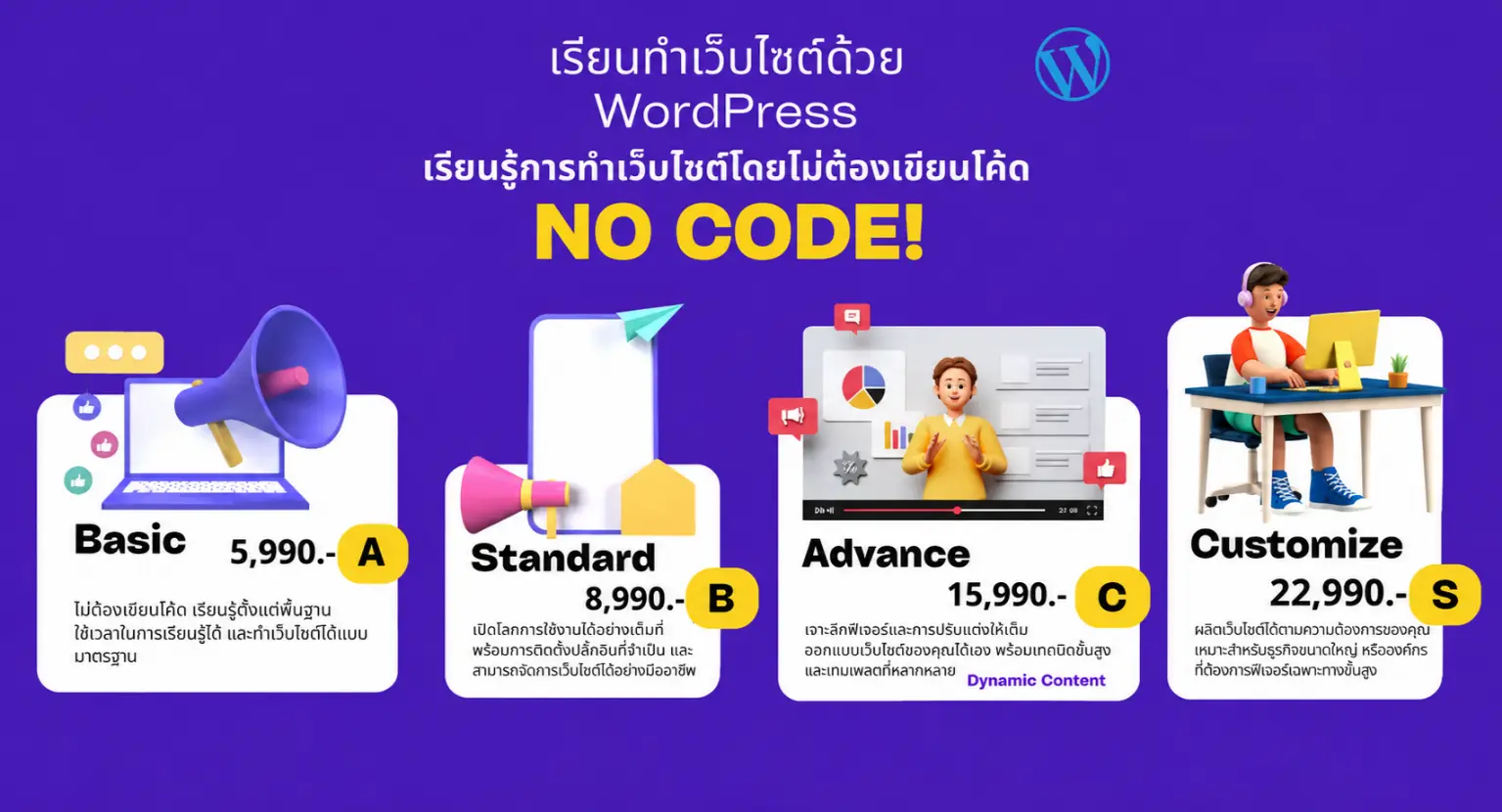
Content details: Contact our staff
Discuss what specific topics you'd like to learn
(Suitable for developing an existing system, with consultation and development support)
* 50% off! For groups of 3 or more students
* Classes on Saturday and Sunday, 3 hours per day
Faculty and Administrators, Chiang Mai University
A group of professionals learning to further their Mobile Application business, Nakhon Ping Energy Research and Development Institute
Staff of the Energy Research and Development Institute, Nakhon Ping, Chiang Mai University
A group of professionals learning to develop their tourism, travel, and service business
A group of professionals learning to develop their online sales business
Tony, IT Officer at Mahamakut Buddhist University, Lanna Campus
Pop, an employee at Worship Visa, wanted to build a website for the company...
Mind, owner of a nationwide termite control company
Khun Priew, owner of Worship Visa business, processing visa applications worldwide
Khun Ning, owner of Pilin Gemes jewelry shop, came all the way from Australia to learn (online class)
Khun Om, owner of KPN Package Premium business, Chiang Mai Province
CEO of Medicalintertec Company, distributor of medical equipment
Kin, Freelance Website Designer
Khun Chok, Freelancer and owner of a supplement and energy drink business